 MailCode
Years of mail, on your own disk.
MailCode
Years of mail, on your own disk.
MailCode
Years of mail, on your own disk.
MailCode
Years of mail, on your own disk.
Tips › Search
You remember the file — “the invoice”, a forecast spreadsheet, a signed PDF — but not who sent it or when. MailCode can search the attachment names themselves, across every account and every archive you have imported, in one search.
a: and part of the file name: a:invoice,
a:forecast, or a:.pdf for every PDF.f:alice narrows by sender, dd:2023
to one year, and plain words search the subject and body as well:
a:contract f:legal dd:2023.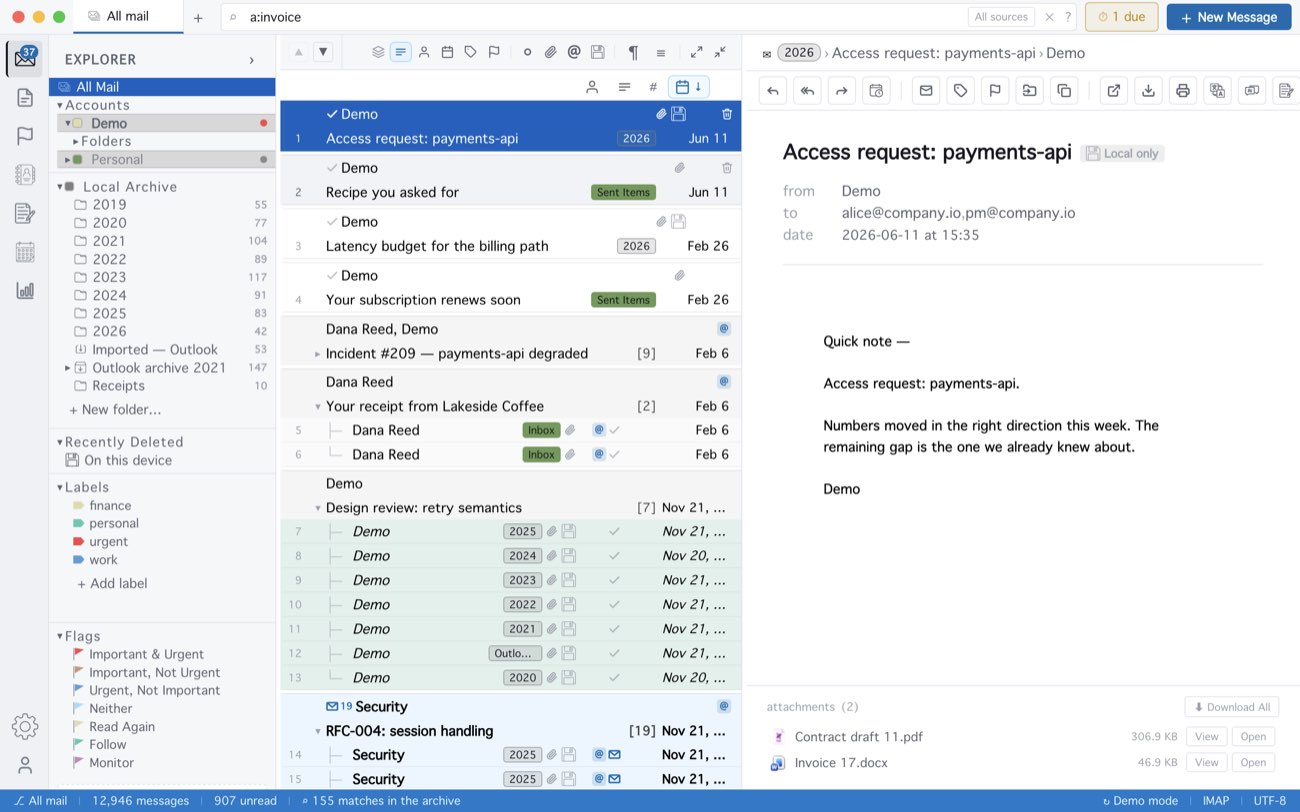
a:invoice across All Mail: 155 matches, with the files in the opened message listed under it.a: matches real attachments only, not the logo images in signatures,
so a search for a:.png is not buried in them. It answers from the mail
MailCode keeps on your disk — everything inside the “Keep mail locally” window, and
everything imported — so it works offline and does not touch the server.
MailCode is a mail client for Mac and Windows that keeps your mail in a searchable archive on your own disk. Free for 14 days.
Mac App Store Download for Windows