Years of mail, on your own disk.

Tips › Storage

Gmail storage full? Keep a copy of your old mail, then free the space

1 October 2026 · searched as gmail storage full

Google’s free 15 GB is shared by Gmail, Drive and Photos, and mail with attachments fills it faster than anything. Before you delete old mail to make room, keep a searchable copy of it on your own disk with MailCode — then delete it in Gmail knowing nothing is lost.

How to do it

  1. Add the Gmail account to MailCode. Gmail needs an app password for this — the user guide walks through making one.
  2. In Settings ▸ Sync, set Attachment downloads to During sync. The copy then carries every attachment, not just the ones you happened to open.
  3. Click the mailbox size in the status bar to open Mailbox storage. It shows how much of the 15 GB is used and which folders are the largest.
  4. Pick a date, keep inbox and sent items ticked, tick copy only — leave everything on the server, and choose Move Old Mail. Nothing is removed from Gmail, and mail already copied is skipped, so it is safe to run again.
  5. Mail you archived in Gmail lives only in its All Mail folder. Copy that too with File ▸ Sync Folder… and [Gmail]/All Mail.
  6. Now free the space in Gmail on the web. Search older_than:2y, or larger:10M for the heaviest mail, select all, delete — and empty the Bin, which is the step that actually gives the space back.
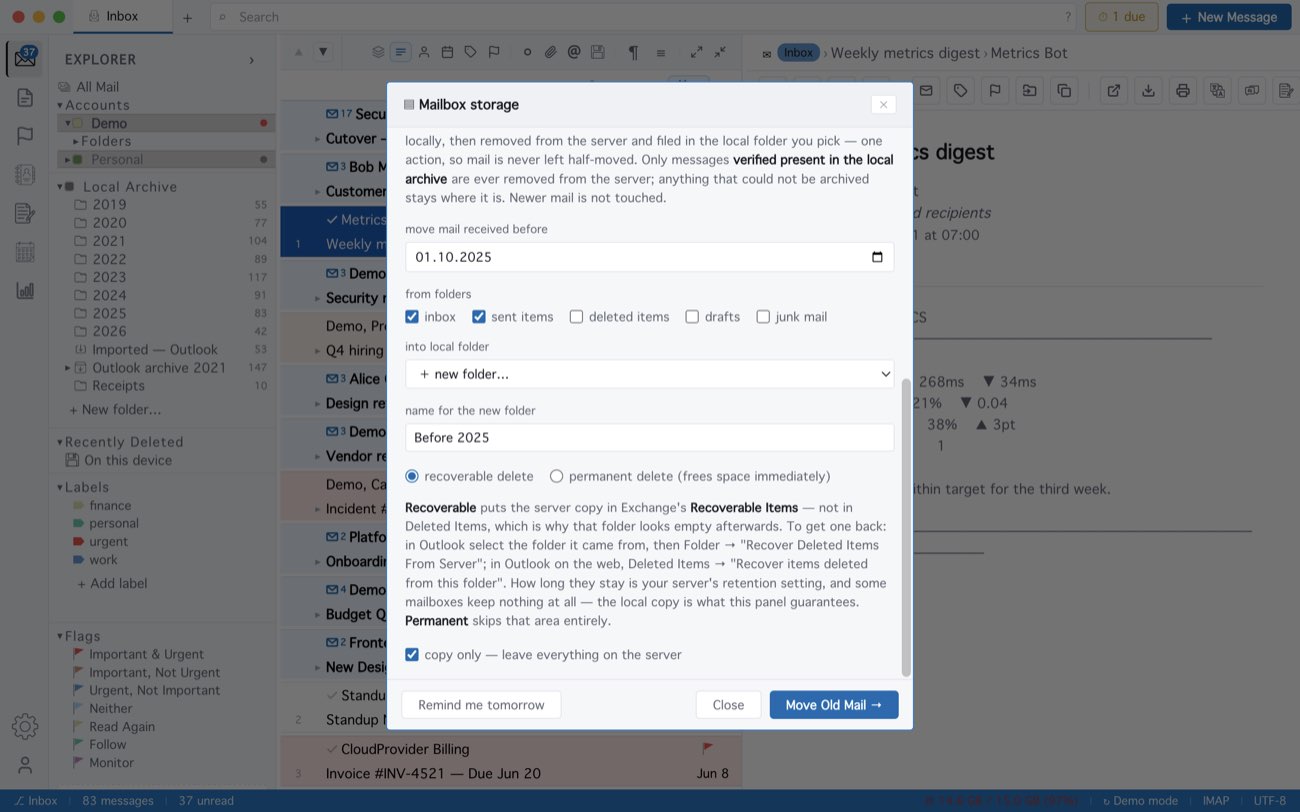
MailCode: Mailbox storage for a Gmail account at 97% of 15 GB, with “copy only” ticked.
Mailbox storage for a Gmail account at 97% of 15 GB, with “copy only” ticked.

The copy stays in MailCode’s local archive with the rest of your mail: searchable, readable offline, attachments included, long after Gmail has let go of it. MailCode itself does not delete anything from Gmail — that last step is yours, in Gmail.

MailCode is a mail client for Mac and Windows that keeps your mail in a searchable archive on your own disk. Free for 14 days.

Mac App Store Download for Windows
© 2026 MailCode. Made in Ankara. MailCode Releases Support Privacy Terms Disclaimer Contact