Years of mail, on your own disk.

Tips › Organising

Sort your email with the Eisenhower matrix

5 October 2026 · searched as eisenhower matrix for email

Urgent and important are two different questions, and the Eisenhower matrix asks both: do it now, schedule it, hand it off, or let it go. MailCode’s flags are those four boxes, so the matrix fills itself as you flag mail — with three more beside it for what you are following, watching, or meaning to read again.
How to do it

  1. Open a message and click Flag in the reading-pane toolbar, or right-click it ▸ Flag…. Pick Important & Urgent, Important, Not Urgent, Urgent, Not Important or Neither.
  2. Give it a date if it has one: + due on the flag line opens Planned completion — Today, Tomorrow, +1 week, or a date. 🔔 remind sets an alert for an exact time.
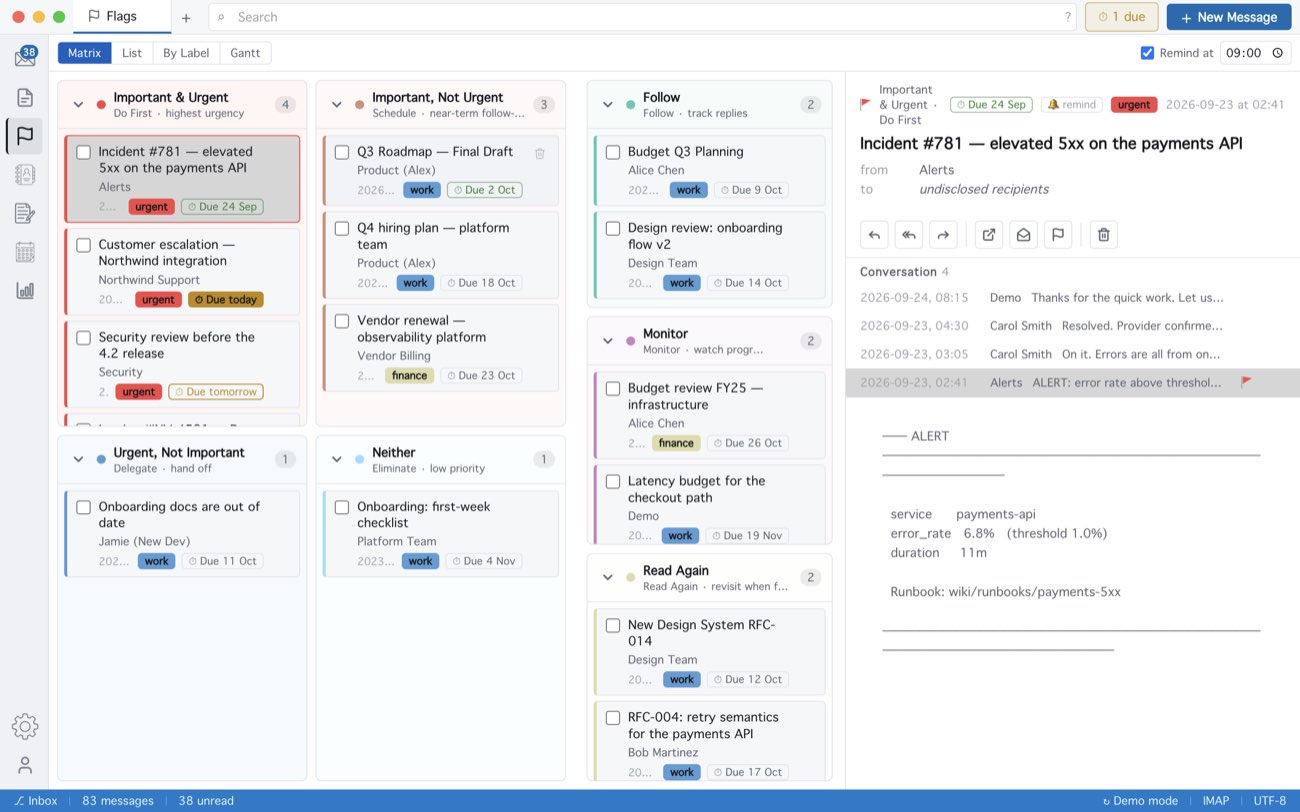
  3. Open Flags in the activity bar. Matrix lays the four quadrants out as the 2×2, with Follow, Monitor and Read Again beside it.
  4. Work from the board. Click a card to read the mail; tick its box when it is done, which clears the flag. To move it to another quadrant, give it a different flag.
  5. List shows everything flagged in one sortable list, By Label groups it by label, and Gantt draws it on a timeline by due date.
MailCode: The Matrix: four quadrants, with Follow, Monitor and Read Again beside them.
The Matrix: four quadrants, with Follow, Monitor and Read Again beside them.

Flags belong to single messages rather than whole conversations, and work on every account — Exchange, Gmail, any IMAP — and on mail in the local archive. A badge beside New Message counts what is due; with Remind at on (09:00 unless you change it) that is your morning list.

MailCode is a mail client for Mac and Windows that keeps your mail in a searchable archive on your own disk. Free for 14 days.

Mac App Store Download for Windows
© 2026 MailCode. Made in Ankara. MailCode Releases Support Privacy Terms Disclaimer Contact