 MailCode
Years of mail, on your own disk.
MailCode
Years of mail, on your own disk.
MailCode
Years of mail, on your own disk.
MailCode
Years of mail, on your own disk.
Tips › Search
Their number is in a signature somewhere, in one of the few hundred mails they have sent you. Instead of opening them one by one, ask: MailCode reads the mail it finds and lists the numbers in it, the most used first, each with the message it came from.
find phone number of Alice Chen — and
press Enter. Turkish works too: Alice Chen'in telefonu.email address of the supplier,
iban of Acme Ltd, links about the rollout.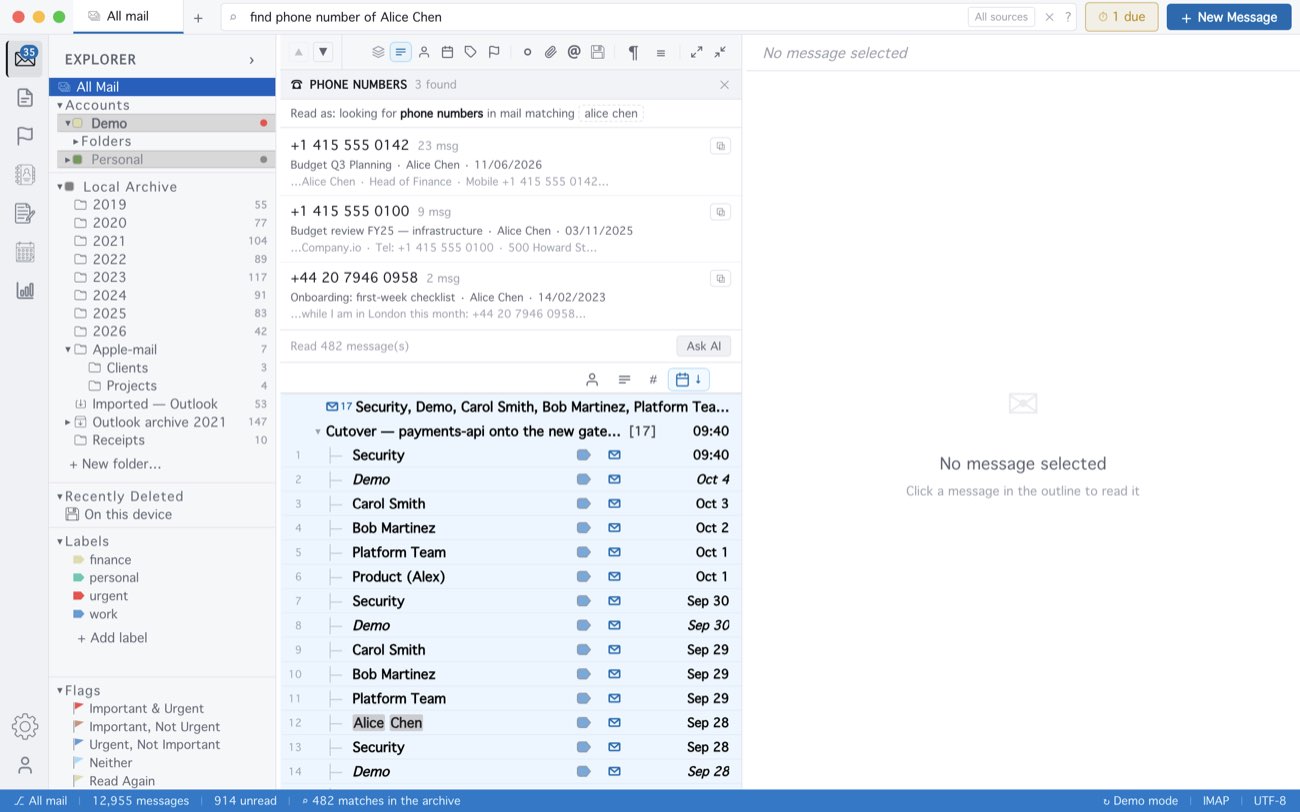
It all happens on your computer: the numbers are picked out by pattern, nothing is sent anywhere, and it works offline. It reads the mail stored on this device — everything inside Keep mail locally, and everything imported — up to the newest 500 matching messages. The same number written three ways counts once. Read as shows the search it ran: click it to refine the search by hand, or ✕ to search the words as typed.
MailCode is a mail client for Mac and Windows that keeps your mail in a searchable archive on your own disk. Free for 14 days.
Mac App Store Download for Windows