 MailCode
Years of mail, on your own disk.
MailCode
Years of mail, on your own disk.
MailCode
Years of mail, on your own disk.
MailCode
Years of mail, on your own disk.
Tips › Search
“Sometime in spring 2023, from Dana” is often all you remember. MailCode takes the dates as part of the search, typed or picked from a calendar, alongside whatever else you know.
df: (from) and dt: (to) with the dates, year first:
f:dana df:2023-03 dt:2023-06 is Dana’s mail from the start of March to the end of
June 2023.dd:: dd:2025 is the whole year,
dd:2025-03-14 one day.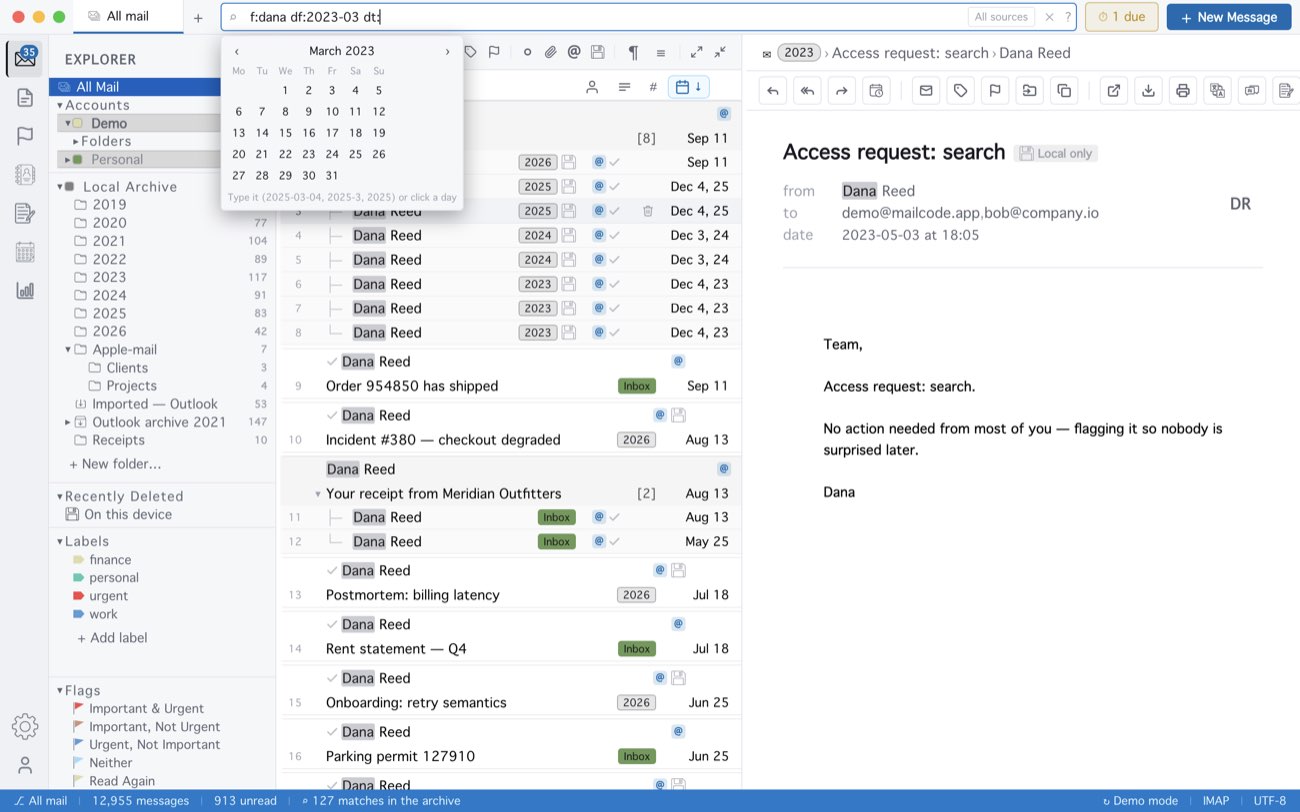
Dates are written year first — 2025, 2025-03,
2025-03-14; dots or slashes work in place of dashes, but a date written day first
(14.03.2025) is not read as one. A partial date widens: df:2025-03 starts on 1 March,
dt:2025-03 ends on the 31st. With OR, give each alternative its own
dates. af: and at: do the same for the day mail was added to the
archive.
MailCode is a mail client for Mac and Windows that keeps your mail in a searchable archive on your own disk. Free for 14 days.
Mac App Store Download for Windows