 MailCode
Years of mail, on your own disk.
MailCode
Years of mail, on your own disk.
MailCode
Years of mail, on your own disk.
MailCode
Years of mail, on your own disk.
Tips › Search
Search for two words and you get every mail that mentions both — in the first line and the last, for all the search cares. A proximity search asks for them close together, in the same sentence, whichever comes first.
b: for the message text, and add ~
and a number straight after the closing quote: b:"vendor timeline"~5 finds the
two within five words of each other, in either order.~0 means side by side, either way round; a bare ~ means within
10.s:), the sender (f:) and on
plain words. Combine it with anything else: f:dana b:"vendor timeline"~5.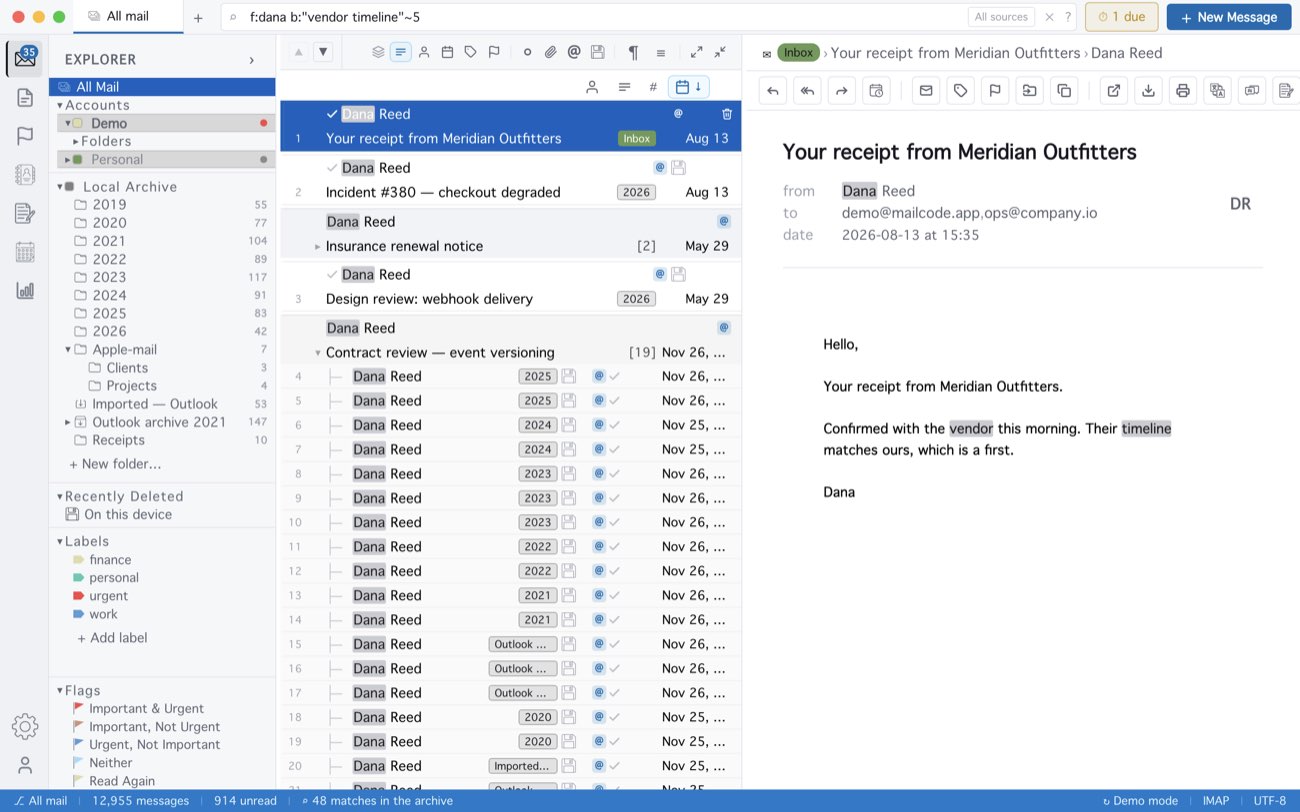
Without the number, b:"vendor timeline" is an exact phrase — the two
words side by side, in that order. The ~ has to touch the closing quote: with a
space before it, MailCode searches for “~5” as a word. The distance is measured in the mail
stored on this device; in a folder that is only on the server, MailCode checks that both
words are there. t:, cc: and a: have no distance to
measure.
MailCode is a mail client for Mac and Windows that keeps your mail in a searchable archive on your own disk. Free for 14 days.
Mac App Store Download for Windows