 MailCode
Years of mail, on your own disk.
MailCode
Years of mail, on your own disk.
MailCode
Years of mail, on your own disk.
MailCode
Years of mail, on your own disk.
Tips › Reading
Most translators take a PDF and hand back plain text, with the letterhead, the stamps and the layout gone. MailCode translates the PDF on its own page: each block of text is replaced where it stood, and the logo, the stamp and the signature stay exactly as they were.
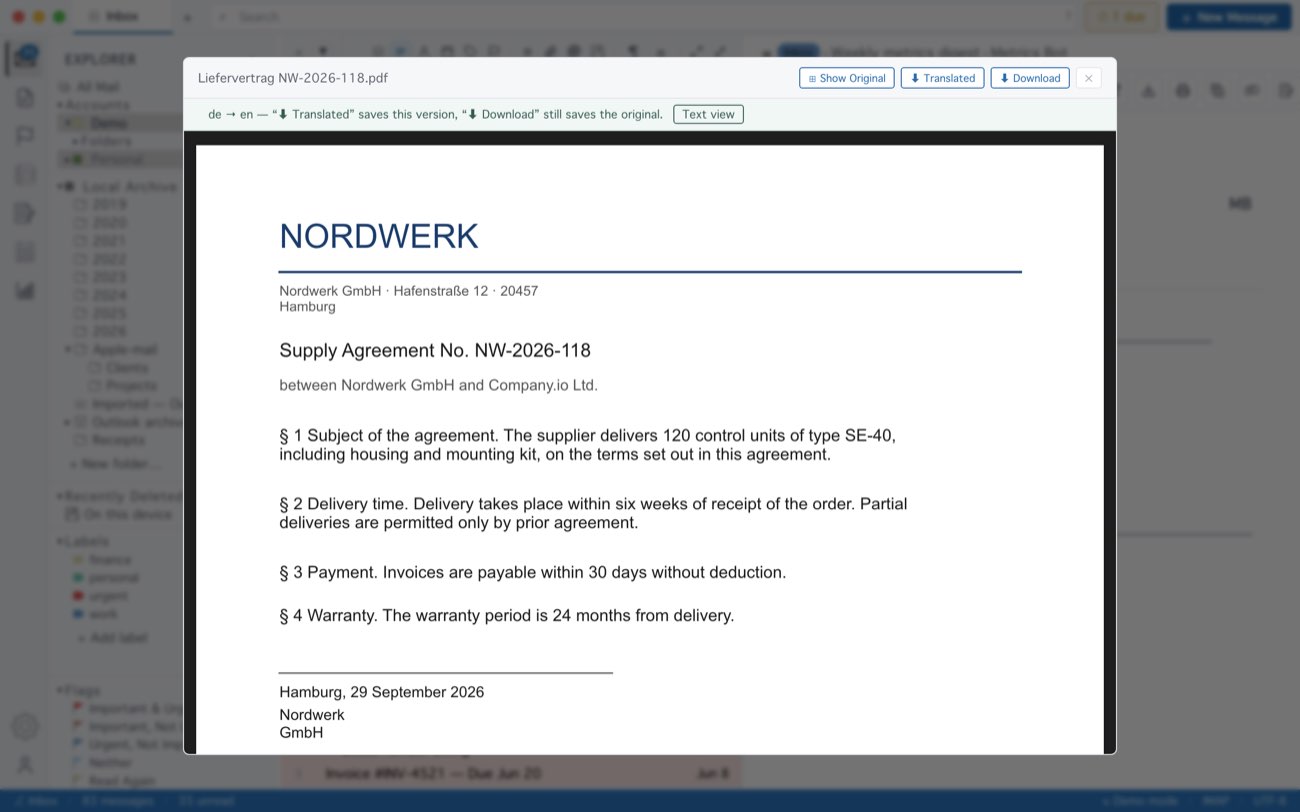
Text set side by side on the page — table cells, two addresses next to each other — can come back run together into one block; Text view reads better for those. Word (.docx) and Excel (.xlsx) attachments translate the same way, and ⬇ Translated saves a real .docx or .xlsx with its headings, tables and styles. A scanned PDF has no text in it to translate, and MailCode says so; reading the pages first with macOS’s own OCR is not in the current App Store version. Translation goes through Google’s free service, so it needs an internet connection; a document is translated up to 120,000 characters. The file in the mail is never changed.
MailCode is a mail client for Mac and Windows that keeps your mail in a searchable archive on your own disk. Free for 14 days.
Mac App Store Download for Windows